
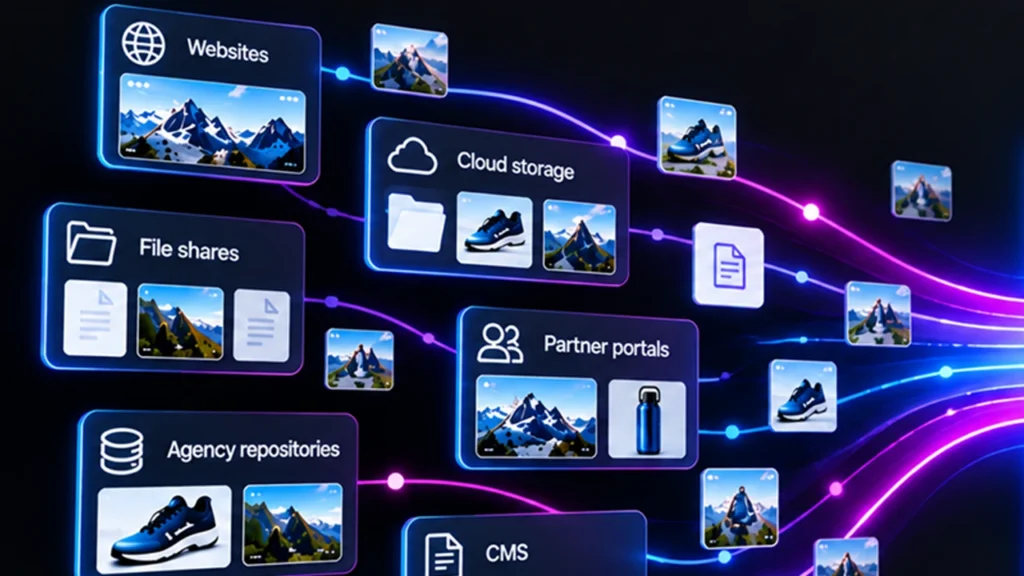
Governance projects often stall at the same point. A business team wants consistent brand and compliance control across the content estate. IT looks at the estate, which spans cloud storage, a CMS, partner portals, agency repositories, and a DAM. The first proposal is a consolidation project: move everything into one system. The timeline stretches across quarters, the cost includes data cleanup, and several owners resist.
An alternative architecture avoids the consolidation step. It treats content in its current location as a source to observe, not a payload to move. IT connects to each source, builds an index of what exists, and runs checks against an approved reference.
This article describes that architecture for IT and MarTech readers: why migration stalls, what the components are, what to evaluate in each, how APIs fit, and what a realistic rollout looks like.
TL;DR
- Teams can add content governance across existing systems without migrating content by using a discovery layer that connects to each source, fingerprints the content, relates it to approved records in a reference system such as a DAM, and applies policy checks.
- The architecture has five parts: source connectors, a discovery layer, a reference system, a policy engine, and a findings layer.
- IT teams should evaluate connector coverage, access scope, audit logging, and API openness.
- Compared with migration, this approach shortens time to visibility, limits disruption to source systems, and keeps ownership where it already sits.
Why Do Governance Projects Stall on Migration?
Governance projects stall on migration because moving content is expensive, risky, and politically difficult, while the governance benefit depends on the move finishing. The dependency creates long delays before any value appears.
Technical costs include mapping metadata between systems, resolving duplicates, preserving permissions, and repointing links. Organizational costs include convincing owners to give up control of their files. Risk includes broken workflows during cutover, since many teams depend on current locations. Agencies and partners often cannot or will not migrate their files at all.
These obstacles make full consolidation an unreliable prerequisite. A governance architecture that works across systems removes the dependency. It delivers visibility from the start, then supports selective consolidation later where evidence shows it pays off.
What Is a Content Discovery Layer?
A content discovery layer is a system that connects to content sources, inventories their assets, and records relationships without relocating the files. It provides the visibility foundation for governance.
Definition: A content discovery layer indexes content across multiple systems by reference, creating a unified inventory with identity, provenance, and relationship data for each asset, while the files remain in their original locations.
The layer stores metadata about content: where it is, what it is, how it relates to approved assets, and what checks it passed or failed. It does not need to hold the content itself to perform these functions. This separation is why the approach avoids migration.
What Does the Reference Architecture Look Like?
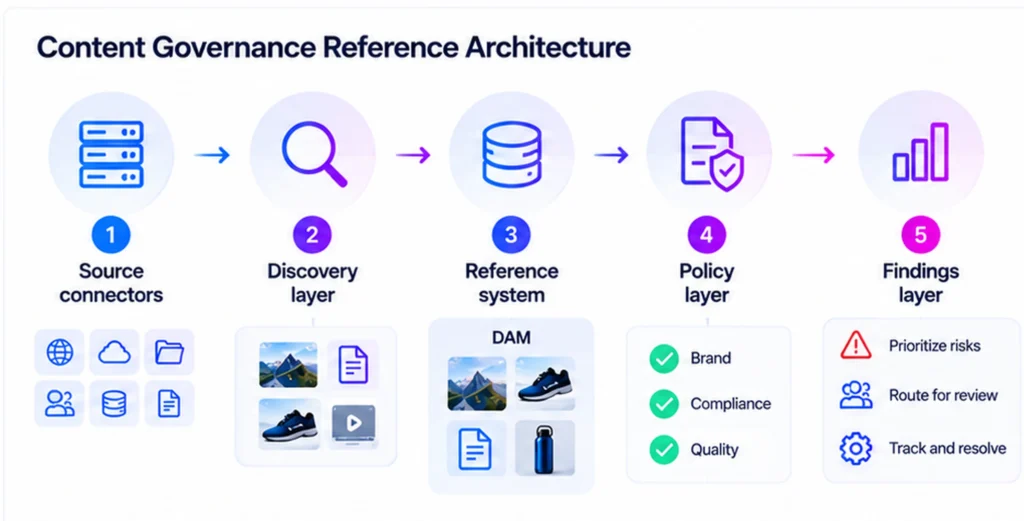
The reference architecture has five layers that move from access to action. Each layer has a distinct job and a distinct set of evaluation questions.
- Source connectors. Connectors authenticate to each system, such as websites, cloud storage, file shares, portals, and CMS platforms. They read content and metadata within the scope the credentials allow.
- Discovery layer. This layer fingerprints each asset, extracts metadata, detects duplicates, then builds a relationship graph that maps discovered content to known assets.
- Reference system. A DAM or similar system supplies the approved assets, rights data, approval status, and brand standards used for comparison. Without a reference, checks that need comparison cannot run.
- Policy layer. Rules and automated agents evaluate content for brand, compliance, or quality. Exceptions route to human review.
- Findings layer. A risk dashboard prioritizes findings. Integrations with ticketing or workflow tools support remediation, with an audit log recording decisions.
| Layer | Core question for IT | Typical risk if weak |
|---|---|---|
| Connectors | Which sources can it reach, and with what permissions? | Blind spots in the inventory |
| Discovery layer | How accurate is matching across copies and edits? | False positives or missed variants |
| Reference system | Is it authoritative and current? | Checks compare against stale standards |
| Policy layer | Can teams tune the rules, then explain each decision? | Opaque or inconsistent enforcement |
| Findings layer | Does it integrate with existing tools? | Findings with no path to resolution |
What Should IT Evaluate in Connectors, Security, and Audit Logging?
IT should evaluate connector coverage, permission scope, data handling, and audit capabilities. These determine whether the architecture satisfies security review.
On connector coverage, confirm support for each source in the estate, and ask how new sources get added. On permission scope, prefer the narrowest access that supports the checks, then confirm how credentials are stored and rotated. On data handling, ask whether content is copied, cached, or processed in place, and where processing happens. On audit capability, confirm that every automated decision, human override, and policy change is logged with timestamps, identities included. Regulated industries often require this evidence.
Human oversight matters as well. Automated checks should flag exceptions for review, with the ability to confirm, reject, or escalate a finding. The AI governance models for enterprise content operations article describes oversight patterns for AI-assisted decisions.
How Mature Is Your Content Governance?
Benchmark where your content governance program stands today, then see where to focus first.
How Do APIs and MCP Fit In?
Open APIs and the Model Context Protocol let governance data flow into existing tools. Agents can then act on it. Open interfaces reduce lock-in and support custom workflows.
A headless API exposes inventory, findings, and status to other systems, so a team can feed governance data into a data warehouse, a ticketing tool, or a CMS. The Model Context Protocol is an open standard for connecting AI applications to tools and data sources. Support for it allows agents to query governance data or trigger actions through a consistent interface. For background, see Model Context Protocol and DAM AI agents.
IT teams should also ask about bring-your-own tooling. Some organizations want to plug their own checks or models into the governance flow. An open framework supports that, while a closed one forces teams to use only the vendor’s checks.
For wider integration context, see how DAM integrates with CMS, PIM, and ERP. The post on the most important DAM integrations describes patterns that apply on the reference-system side. The Aprimo integrations page lists available connections.
How Does This Map to Aprimo Content Portfolio Management?
Aprimo Content Portfolio Management (CPM) implements this architecture. Mesh handles discovery by scanning websites, file storage, partner portals, social accounts, and the DAM, with no content migration required, as the launch post explains. Aprimo’s Librarian, Critic, and Compliance agents run policy checks through the Open Agent Framework. The Portfolio Risk Dashboard prioritizes findings. Per the product design, the framework supports human-in-the-loop review, bring-your-own MCP tools, headless API access, MCP access, and audit logging.
Packaging determines which checks run. A deployment with only CPM supports discovery, duplicate detection, accessibility checks, and risk scoring. Adding a DAM as the reference enables comparisons for rights, expiry, status, and version conflicts. Additional connectors beyond websites extend coverage to sources such as cloud storage and repositories. The IT team page outlines how Aprimo supports technology owners.
What Does a Realistic Rollout Look Like?
A realistic rollout starts with one or two high-risk sources, validates results, then expands. Aprimo’s launch post states that implementation typically takes weeks rather than months, which reflects the absence of a migration step. Actual timing depends on the number of sources, access approvals, and policy complexity.
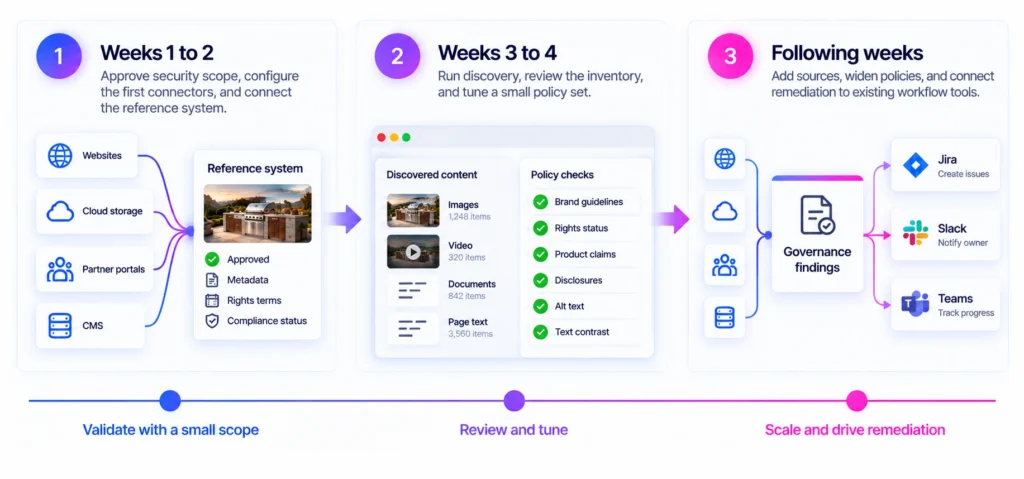
A sample phased plan shows the sequence. The week counts are illustrative and will vary by organization:
- Weeks 1 to 2. Approve security scope, configure the first connectors, and connect the reference system.
- Weeks 3 to 4. Run discovery, review the inventory, and tune a small policy set.
- Following weeks. Add sources, widen policies, and connect remediation to existing workflow tools.
The final phase deserves emphasis. A governance system that produces findings without a path to resolution will lose credibility. Connecting to the ticketing or workflow tools that teams already use turns findings into work.
Conclusion
Migration is one way to get content under control, but it is not the only way, and it is rarely the fastest. An architecture that observes content where it lives, compares it to an approved reference, and routes exceptions to owners gives IT a path that respects existing systems, yet still delivers control.
For IT leaders, the decision comes down to scope and openness. How many sources can the architecture reach? How openly can its data and agents plug into the rest of the stack? Teams that ask both questions before selecting a tool avoid trading one silo for another.
FAQ
Does governing content in place mean IT gives a vendor access to all content?
Access depends on the connector configuration and the credentials granted. Review the scope each connector requests, how data is processed, and what is stored. Apply least-privilege access.
What happens if a source system changes its API?
Connector maintenance is a vendor responsibility in most managed products. Ask how the vendor handles source API changes, and what service commitments apply.
Can the approach work with on-premises file shares?
It can, if the system supports network or on-premises connectors. Confirm support for the specific storage type. Review network and security requirements.
How is the reference system kept current?
The governance layer reads approved records from the reference system, so updates in the DAM flow into comparisons. Confirm the synchronization frequency for the integration in use.
Does this replace existing security or DLP tools?
No. Content governance focuses on brand, compliance, and quality of content. Security tools and data loss prevention tools address other risks, so they remain necessary.
Who typically owns the architecture?
IT or MarTech owns connectivity and security, while content operations or brand owns the policies. Shared ownership works best when roles are written down.
Related reading: governing content outside the DAM, DAM versus content governance, finding duplicate assets across storage.