
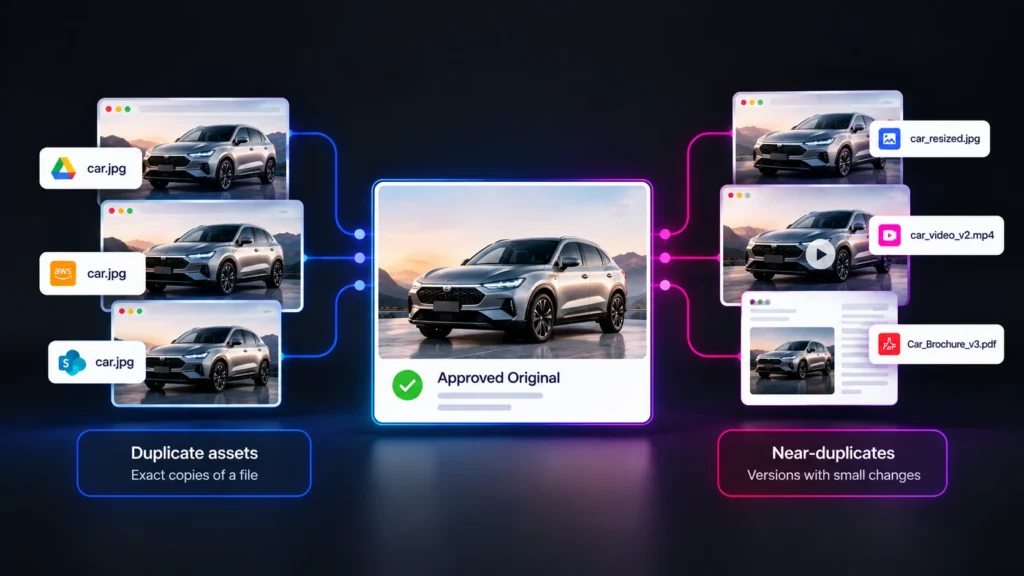
A marketing team searches for the current product image and finds fourteen files with similar names. Some sit in the DAM. Some sit on a shared drive. A few live in an agency folder, and two appear on the public website. Several look identical. A few differ by a pixel crop or a color adjustment. One shows a package design that was retired last year.
Picking the right file takes time. Picking the wrong file spreads the problem. Multiply this by thousands of assets, and the cost becomes clear: wasted storage, wasted search time, and a constant risk that an outdated or unapproved version ends up in market.
Duplicate management usually starts as a housekeeping task. This article explains why it matters for governance, how detection works, how to choose the canonical version, and how to prevent the problem from reforming.
TL;DR
- Duplicate assets are exact copies of a file.
- Near-duplicates are versions with small changes, such as a resized image, a recompressed video, or a document with edited text.
- Finding both across multiple storage systems requires fingerprinting every file, comparing fingerprints for exact or similar matches, and relating each match to an approved original.
- The real risk lies in near-duplicates, because they can carry outdated claims, expired rights, or off-brand elements while looking nearly identical to the approved version.
- A clear canonical-version rule and continuous detection keep the problem from returning.
Why Do Duplicate Assets Multiply Across Storage Systems?
Duplicates multiply because every handoff, download, edit, or export creates a new copy. Most systems do not track the relationship between copies. Over time, one approved asset becomes dozens of files in different places.
Common causes include creative workflows that export many versions, agencies that keep their own archives, regional teams that localize files, and users who download assets to work offline. Tools that save to personal or team folders add more copies. Migrations and acquisitions bring in whole repositories that overlap with existing content. Asset reuse in the age of AI increases the pressure, since reuse of a single asset produces many variants.
The problem compounds because storage systems are independent. A cloud bucket does not know what the DAM holds. A shared drive does not know which file is current. Without a layer that sees across them, each system keeps its own version of the story. How to organize company digital assets addresses naming and structure, but structure cannot detect copies made outside it.
What Is the Difference Between Duplicates, Near-Duplicates, and Derivatives?
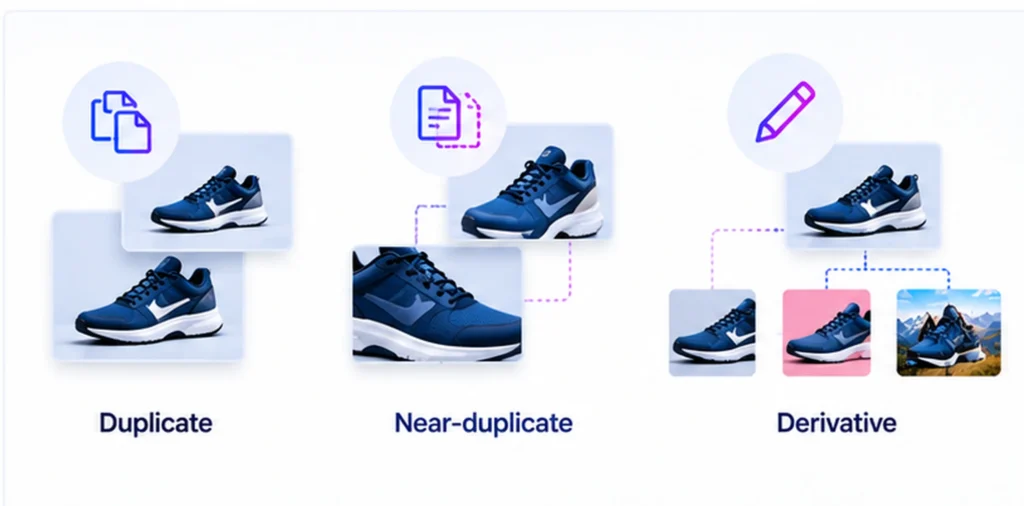
Duplicates match exactly, near-duplicates match closely with small changes, and derivatives are intentional adaptations of an original. Each needs a different response.
Definition: A duplicate asset is a file identical to another at the byte level. A near-duplicate is a file that looks or reads almost the same as another but differs in format, size, compression, crop, or minor content. A derivative is a file created from an original through a deliberate edit, such as a localized version or a channel-specific crop.
Exact duplicates are the easiest to find and the least dangerous. They waste space but carry the same content as the original. Near-duplicates are harder to find and more dangerous, because small differences can change meaning. A cropped image may remove a required disclosure. A recompressed logo may shift color. An edited document may carry old terms. Derivatives are legitimate when the organization created them on purpose, but they still need a link to the parent so that parent changes can reach them.
The practical goal is to know the relationship. For every file, a team should be able to say whether it is the original, an approved derivative, a copy, or an unknown variant.
How Does Duplicate and Near-Duplicate Detection Work?
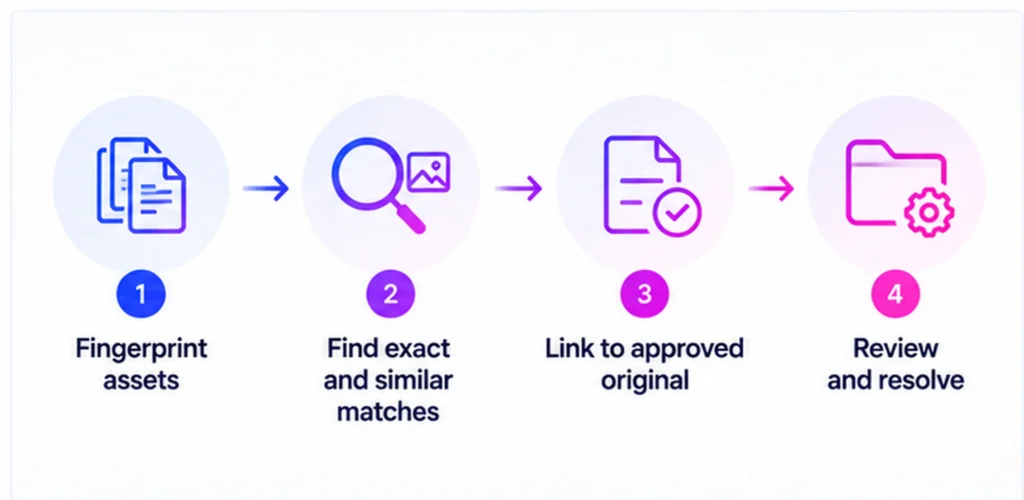
Detection works by computing a fingerprint for each file, then comparing fingerprints to find matches. Exact methods catch identical copies, and similarity methods catch altered ones.
- Cryptographic hashing. A hash function produces a fixed value from a file’s bytes. Identical files produce identical hashes, which makes exact duplicate detection fast. Any change, even one pixel, changes the hash completely.
- Perceptual hashing. Perceptual hashing produces values based on how content looks or sounds instead of its bytes. Visually similar images yield similar hashes, so resized or recompressed copies still match.
- Metadata comparison. File names, embedded metadata, or extracted text can reveal related documents even when binary content differs.
- Visual or semantic similarity. Machine learning models can compare content at a higher level, such as recognizing a product shot across different backgrounds.
No single method covers every case. Strong detection combines methods, then assigns a confidence level to each match. Reviewers can then focus on uncertain matches, while high-confidence matches flow into automated handling.
Detection across storage systems adds one more requirement: the ability to reach each system. A fingerprinting engine that only scans the DAM cannot find copies in a cloud bucket. Cross-system detection depends on connectors to each source.
What Risks Do Near-Duplicates Create?
Near-duplicates create version conflicts, rights exposure, compliance gaps, and brand inconsistency. The risk comes from variants that look right but are not.
Version conflicts arise when two similar files carry different content, and users cannot tell which is current. Rights exposure arises when a derivative of a licensed asset outlives the license on the original. Compliance gaps arise when a copy of an approved document circulates after the approved version changed. Brand inconsistency arises when edited variants drift from approved color, crop, or composition.
Each risk traces to the same cause: a copy lost its link to the approved original. When a system can relate each copy back to its source, a change to the original, such as an expiry or a withdrawal, can be applied to every related file. Without that link, the organization must find each copy by hand.
How Mature Is Your Content Governance?
Benchmark where your content governance program stands today, then see where to focus first.
How Do You Decide Which Copy Is the Canonical Version?
Choose the canonical version by defining a rule in advance: the approved, most recent, rights-cleared file held in the system of record. Apply that rule consistently, then relate every other file to it.
- Name the system of record. For approved brand and marketing content, this is usually the DAM.
- Identify the approved original for each asset family. Confirm approval status, version, and rights.
- Classify the other files. Mark each as an exact duplicate, an approved derivative, a near-duplicate, or an unknown.
- Decide the action for each class. Delete or archive exact duplicates, link approved derivatives to their parent, and review near-duplicates for update or removal.
- Record the decisions. A decision log shows why a file was kept or removed, which supports audits.
Edge cases need judgment. A near-duplicate might hold a legitimate regional edit that the DAM lacks. In that case, promote it into the DAM as an approved derivative instead of deleting it. Treating discovery as input for decisions, not just cleanup, keeps useful work from disappearing.
How Does Portfolio Management Software Handle Duplicates?
Portfolio management software fingerprints content across connected sources and relates each item to known approved assets. Aprimo Content Portfolio Management (CPM) does this through its Mesh capability.
Mesh scans websites, file storage, partner portals, and the DAM. It fingerprints each asset, deduplicates discovered content against known DAM content, and maps each item to its source location, according to the launch announcement. It also highlights duplicates, derivatives, and linked content, so teams see relationships, not only lists. Duplicate and near-duplicate detection is available without a DAM, while comparisons for version conflicts against a golden source need a connected DAM. Related checks, such as logo and derivative reviews, run through the agents.
How Do You Prevent Duplicates From Returning?
Prevent recurrence by reducing the reasons people make copies and by detecting new copies quickly. Prevention combines workflow design with monitoring.
Give people a faster path to the approved asset than making their own copy. Strong search, direct links, and brand portals reduce the need to download then store local files. Use links or integrations to publish from the DAM, which keeps channels pointing to the original. Set rules for agencies that require delivery into the DAM and deletion of local archives. Run a standing scan so that new copies surface within days. Track the duplicate rate as a metric, since a falling rate shows that the process works.
Duplicate control never ends. The aim is not a one-time purge but a state where new copies appear rarely and get resolved quickly.
Conclusion
Duplicates look like a storage problem until a near-duplicate reaches a customer. At that point the issue is governance: a file that should have been retired, corrected, or never created is now public. Organizations that treat duplicate detection as part of governance, not just as housekeeping, gain a measure of how well they control content after publication.
The practical path is to fingerprint across systems, relate every copy to an approved original, and make a rule for which version wins. The remaining challenge is cultural. People make copies because copies are convenient, so the lasting fix is to make the approved version the easiest one to use.
FAQ
What is the difference between a duplicate file and a version?
A duplicate is an unplanned copy. A version is a tracked revision of the same asset, with history and status. Version control keeps revisions linked, while duplicates lack a link.
Can duplicate detection work on video and documents?
Yes. Exact hashing works on any file type. Similarity methods exist for video, audio, and text. Accuracy depends on the method.
How much storage do duplicates typically waste?
The amount varies widely by organization. Measuring the duplicate rate across connected systems gives a real figure, which is more useful than an industry average.
Should all near-duplicates be deleted?
No. Some are legitimate derivatives. Review them first, then link, promote, or remove each one based on its role.
Does duplicate detection find assets stored in personal folders?
Only if the system has access to those locations. Detection covers the sources connected to it, so scope depends on which storage systems are included.
How often should duplicate scans run?
Continuous or weekly scans catch new copies early. Monthly or quarterly scans allow duplicates to spread between runs.
Related reading: governing content outside the DAM, DAM versus content governance, auditing web content for brand risk.