

A product recall is announced on Monday. The DAM marks the affected images as withdrawn by Monday afternoon. Three weeks later, a customer finds the same product image on a regional microsite, a distributor page, and a campaign landing page that went live a year ago. The DAM did exactly what it was supposed to do. The content outside it did not receive the message.
Expired content problems rarely come from a single failure. They accumulate through ordinary work: a campaign ends with no takedown filed, an agency finishes a project then keeps the files, a license runs out while the asset sits on a page no one checks. Each case looks small. Together they create legal, financial, and reputational exposure that grows quietly.
This article defines the problem of expired campaigns, ranks the types of expired content by risk, describes a method for finding it, explains why deletion does not always end the exposure, and outlines how to stop the problem from recurring.
TL;DR
- Zombie content is material that remains live after it should have come down, such as expired campaign pages, recalled product assets, and images with lapsed licenses.
- It persists because no one owns the task of checking what happens after launch.
- Finding it requires scanning every web property, then every storage location, then comparing what is live against records of expiry, rights, and approval status.
- Prevention depends on attaching expiry data to assets at creation and closing out campaigns with a checklist that includes third-party sites.
What Is Zombie Content and Why Does It Persist?
Zombie content is content that has passed its intended life but remains live, discoverable, or in use. It persists because the workflows that create content are well defined, while the workflows that retire it are not.
Definition: Zombie content is any digital asset, page, or claim that has expired, been recalled, or been superseded but remains accessible on a website, in storage, or on a third-party property.
Three causes explain most cases. First, campaigns end without a close-out owner. The launch team moves on to the next initiative, and the previous one stays published. Second, expiry data lives in the wrong place. The DAM may hold the license end date, but the web page that uses the image has no link to that date. Third, copies multiply. A single asset may exist in the DAM, in a CMS, on a partner site, and in cloud storage. Retiring the original does not retire the copies.
The longer content stays live past its expiry, the larger the exposure. An image with a lapsed license may produce a claim for each month of unauthorized use. A superseded health or financial claim may violate regulations for as long as it stays visible. The management of digital rights and usage expiration in a DAM addresses the record-keeping side. The harder problem is finding where the content went.
Which Types of Expired Content Create the Most Risk?
Rights-expired imagery, recalled or discontinued product content, superseded claims, and ended promotions create the most risk. Risk rises when the content involves legal exposure, customer safety, or financial commitments.
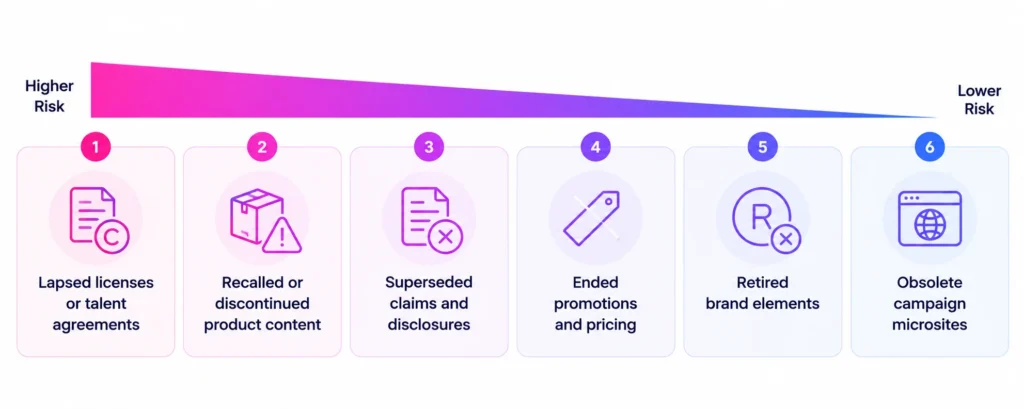
- Content with lapsed licenses or talent agreements. Continued use after expiry can trigger infringement claims or fee disputes.
- Recalled or discontinued product content. Showing a recalled product without the recall notice can mislead customers about safety.
- Superseded claims and disclosures. Product specifications, efficacy claims, or regulatory language change. Old versions can violate current requirements.
- Ended promotions and pricing. An offer that no longer applies can create customer disputes or consumer protection issues.
- Retired brand elements. Old logos or messaging create inconsistency, which can confuse customers about authenticity.
- Obsolete campaign microsites. Abandoned sites often run outdated software, which adds a security concern to the content concern.
Ranking by risk type helps decide scan priorities. A scan that checks rights and recall status first catches the serious items before the cosmetic ones.
How Do You Detect Content That Should Have Been Retired?
Detect expired content by scanning every property or repository, matching each discovered item to approved records, then flagging any item whose record says expired, withdrawn, or superseded. The process has five steps.
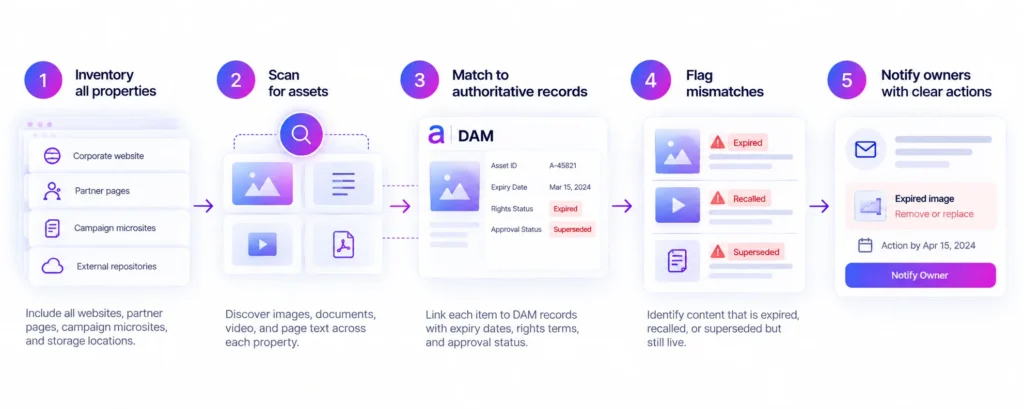
- Build a complete inventory of properties. Include campaign microsites, regional sites, partner pages, and any storage location with public links. Agencies and event teams often launched sites that central teams never registered.
- Scan for assets. Discover images, documents, video, and key page text on each property. Record the location of each item.
- Match each item to an authoritative record. Link the discovered assets to the DAM records that hold expiry dates, rights terms, and approval status. Unmatched items need their own review.
- Flag mismatches. Identify items whose record is expired, recalled, or superseded but whose live copy remains accessible.
- Notify the owner with a clear action. State what to remove, update, or replace, and set a deadline.
The matching step is where most manual efforts fail. A person can see that a campaign page looks old. A person cannot reliably confirm that a specific image on that page has a license that ended in March unless the system connects the live image to its rights record.
Near-duplicate detection also matters. A cropped or recompressed version of an expired image will not match by exact file comparison. Methods that recognize visually similar files, such as perceptual hashing, help find derivatives that carry the same restrictions as the original.
How Mature Is Your Content Governance?
Benchmark where your content governance program stands today, then see where to focus first.
Why Does Removing a Page Not Always Remove the Risk?
Removing a page ends the live exposure, but cached copies, search results, and third-party reposts can keep the content visible. Complete retirement means checking the places the content spread to.
Search engines keep cached versions and snippets for a period after a page changes or disappears. Google provides a Remove Outdated Content tool that lets requesters ask for outdated results to be refreshed or removed, including for pages on sites they do not own, as Search Engine Journal reports. Requests are subject to Google’s review. Partners and distributors may also have copied the assets, which means the brand owner has to follow up with them directly.
A takedown record should therefore include four items: the removed page, the search results requested for refresh, the partner or third-party copies identified, and the date each was confirmed gone. Without that record, a team cannot show an auditor or counsel what it did and when.
How Can Teams Prevent Zombie Content From Recurring?
Prevent recurrence by attaching expiry data to assets at creation, assigning a close-out owner to every campaign, and scanning continuously for exceptions. Prevention reduces the volume of findings that detection has to handle.
A workable program includes five practices. Set an expiry or review date on every campaign asset before launch. Require a close-out checklist that covers owned sites, partner sites, social posts, and paid media. Include agency offboarding steps that cover deletion or return of files and the takedown of agency-hosted pages. Connect rights and status changes in the DAM to downstream systems so that a recall triggers alerts, not just a record change. Run a standing scan so that anything missed gets caught within days.
These practices connect to broader content lifecycle management and to the value of optimizing content lifecycle management. The lifecycle view treats retirement as a planned stage, not an afterthought.
What Role Does Content Portfolio Management Play?
Content portfolio management software automates the scanning, matching, and flagging steps. Aprimo Content Portfolio Management (CPM) is one implementation.
CPM scans campaign sites, matches discovered assets to DAM records, then identifies content past expiration, as outlined in the launch announcement. The expiry and rights comparison against DAM records requires a connected DAM. Duplicate detection works without one, as does unmanaged content analysis. Findings feed a prioritized dashboard, so a team sees an expired license on a high-traffic page before a stale banner on a dormant microsite. The Improve Lifecycle Management page describes the broader lifecycle capabilities.
Conclusion
Zombie content grows in the space between the systems that create content and the systems that retire it. Organizations keep investing in the first set, because launches are visible and measurable. The second set rarely gets the same attention until an incident forces it.
A durable approach makes retirement a measured stage of the content lifecycle, backed by continuous detection that does not depend on someone remembering to look. The test of a mature program is simple: when a recall or a license expiry happens, the organization can say within days where the affected content lives and whether it is still live. Most organizations cannot answer that question today, and the gap is the opportunity.
FAQ
How long can expired content stay online before it causes a problem?
There is no universal threshold. Risk begins when the content stops being valid, and it grows with every day of continued use. Legal and safety content carries the highest urgency.
Does a DAM automatically remove expired assets from websites?
A DAM can mark assets as expired, then block downloads. Integrations can notify connected systems. Copies already published elsewhere remain live until someone removes them. Detection outside the DAM closes that gap.
What is the difference between expired and outdated content?
Expired content has a defined end date, such as a license or a campaign. Outdated content has become inaccurate or superseded without a fixed date. Both need detection, and each needs a different trigger.
Who is responsible for taking down agency-hosted campaign pages?
The campaign owner should be accountable, with the agency obligated by contract to act. Offboarding checklists that list hosted properties make the responsibility clear.
Can social media posts count as zombie content?
Yes. Posts with expired offers or retired imagery stay visible until someone removes them. Include social accounts in the property inventory.
How often should a team scan for expired content?
Weekly or continuous scanning suits active portfolios. Quarterly checks leave long windows during which expired content stays live.
Related reading: auditing web content for brand risk, monitoring dealer sites, finding duplicate assets across storage.