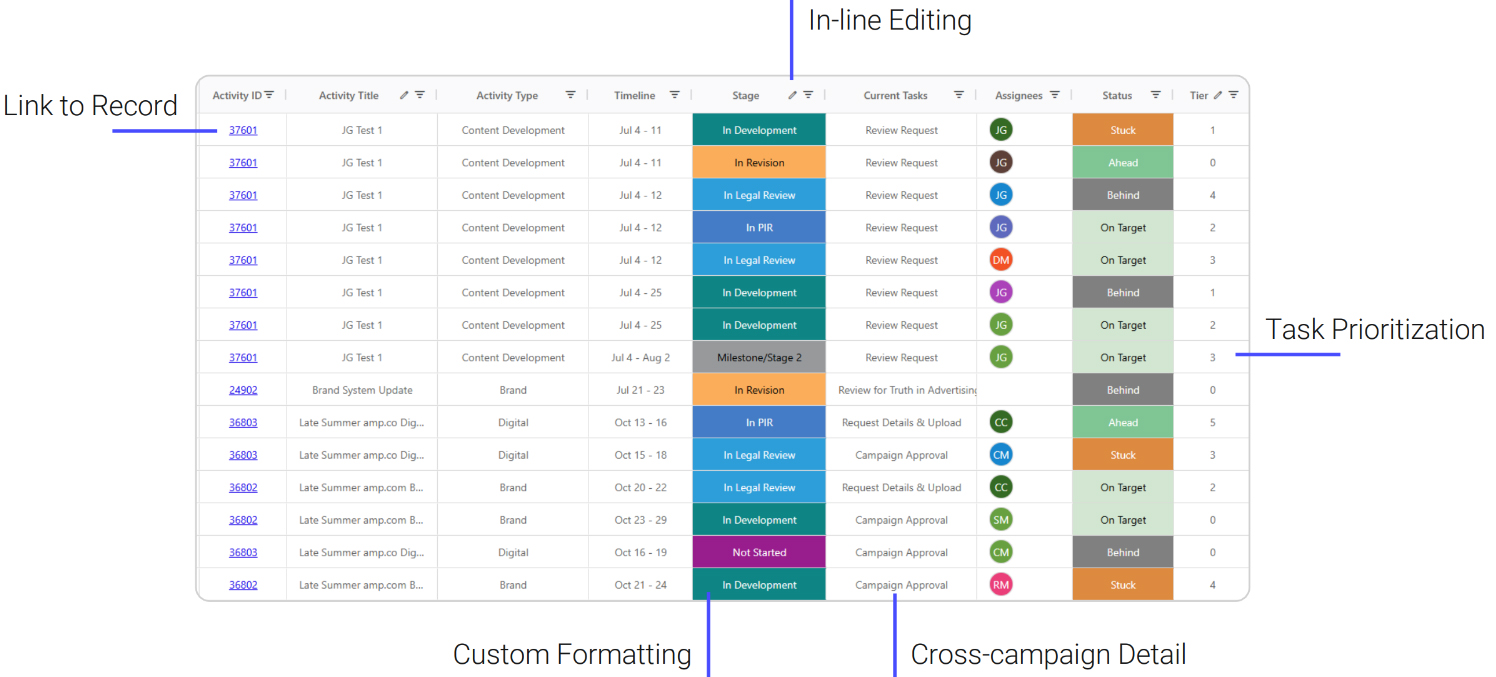
QuickBoards is a productivity enhancement for Aprimo that introduces an Excel-like grid interface for advanced data management and bulk updates. The integration enables project managers to perform inline editing, multi-sorting, and complex filtering across projects, tasks, and resources on a single screen. This solution significantly reduces manual clicks and administrative overhead, allowing teams to accelerate high-volume data maintenance within the Aprimo platform.
What it Does
QuickBoards are a powerful productivity enhancement for the Aprimo platform, offering an Excel-like interface to manage data across Productivity, DAM, Plan, and Spend. Designed to eliminate the need for excessive clicking, QuickBoards allow team members to view and edit metadata for multiple objects—such as Activities, Projects, and Tasks—on a single, unified page. This integration is particularly valuable for Campaign and Project Managers who need to prioritize and schedule resources at scale while maintaining a customized view of their data.
How It Works
QuickBoards functions as an embedded grid interface within the Aprimo environment. Once enabled, it pulls data from the Productivity, DAM, Plan, or Spend modules into a centralized workspace where users can manipulate columns and apply multi-sort filters. Any edits made to the metadata within these cells are processed and written back to the corresponding Aprimo objects in real-time. The integration also supports advanced logic, such as field concatenation and conditional formatting, which are applied directly to the displayed data set before optional export. Aprimo’s partner, Solutions Plus, works with customers to implement and configure QuickBoards.
Key Capabilities
- QuickBoards are a powerful productivity enhancement for the Aprimo platform, offering an Excel-like interface to manage data across Productivity, DAM, Plan, and Spend
- Designed to eliminate the need for excessive clicking, QuickBoards allow team members to view and edit metadata for multiple objects—such as Activities, Projects, and Tasks—on a single, unified page
- This integration is particularly valuable for Campaign and Project Managers who need to prioritize and schedule resources at scale while maintaining a customized view of their data