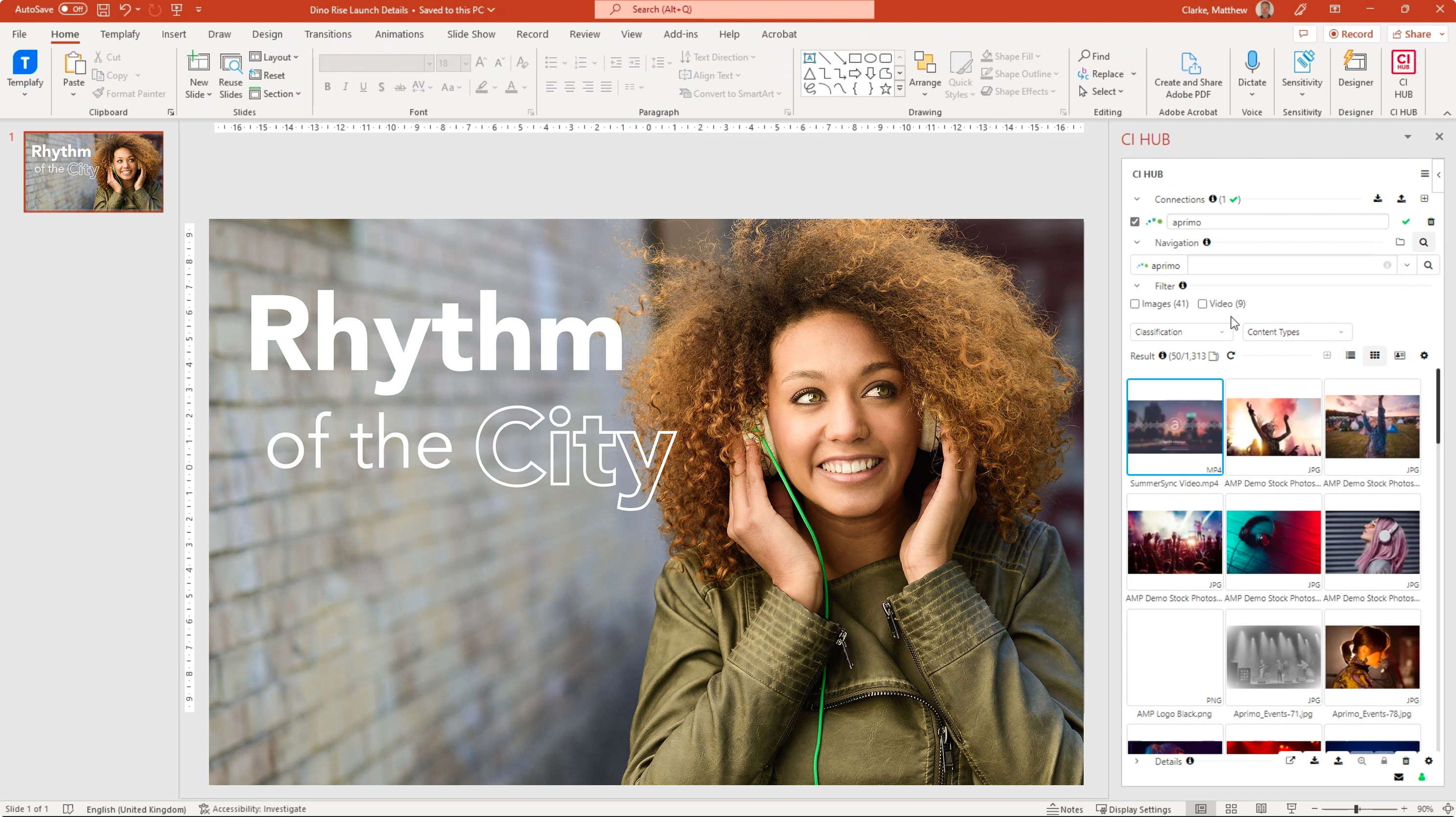
The Microsoft 365 Connector is a productivity integration powered by CI HUB that connects Aprimo Digital Asset Management (DAM) directly to Word, Excel, and PowerPoint. It enables users to browse, preview, and insert brand-approved assets and metadata into Office documents without leaving their active workspace. This integration streamlines content creation and ensures brand consistency by maintaining a direct link between Microsoft applications and Aprimo’s single source of truth.
What it Does
The Microsoft 365 Connector, powered by CI HUB, bridges the gap between the Aprimo Digital Asset Management (DAM) system and the Microsoft Office suite. This integration allows users to remain within their preferred productivity applications—Word, Excel, and PowerPoint—while maintaining a direct connection to their centralized brand assets. By eliminating the need to toggle between platforms, the connector ensures that teams use approved, up-to-date content in every document and presentation, maintaining brand consistency across the organization.
How It Works
The integration functions via a CI HUB add-in installed directly within Microsoft 365 desktop or web applications. Once authenticated with Aprimo credentials, a side panel appears that displays the DAM folder structure and search interface. Users drag and drop assets or click to insert metadata directly into their document; when the document is finished, the connector handles the secure upload process back to Aprimo, maintaining the file relationship and version history.
Key Capabilities
- The Microsoft 365 Connector, powered by CI HUB, bridges the gap between the Aprimo Digital Asset Management (DAM) system and the Microsoft Office suite
- This integration allows users to remain within their preferred productivity applications—Word, Excel, and PowerPoint—while maintaining a direct connection to their centralized brand assets
- By eliminating the need to toggle between platforms, the connector ensures that teams use approved, up-to-date content in every document and presentation, maintaining brand consistency across the organization
Common Use Cases
- Building data-heavy financial reports in Excel using validated product specifications and approved imagery.
- Creating pitch decks in PowerPoint by pulling the latest campaign assets and logos from the DAM.
- Drafting legal or marketing documents in Word with instant access to centralized brand templates and text snippets.
- Finalizing collaborative documents and saving them as new versions in Aprimo for stakeholder review.
Requirements
- Active Aprimo Digital Asset Management (DAM) subscription.
- Microsoft 365 subscription (Word, Excel, or PowerPoint).
- CI HUB user registration (registration at ci-hub.com).
Cost-Free Integration: This powerful integration is available to Aprimo DAM users at no additional cost. Experience the benefits of the CI HUB Office 365 connector by signing up at CI HUB Registration.